
The voice they don't have to say out loud.

A private check-in for pupils who find it hard to speak up. After each lesson they tap a face on a tablet, laptop or our pocket-sized fob to tell the SEND team how their day is going, so staff can spot patterns and step in early, when it matters.

Watch the 2-minute film
No phone needed
Up to 3 taps, under 10 seconds
Data kept in the UK
On the dashboardWaiting for a check-in

This is the real fob's screen. Have a go.

Watch: 2 minutes

See how it works, through Oliver's story.

From a worried Sunday night to a school that feels easier: what Oliver does, what his SEND team sees, and how it helps.

Subtitles are part of the film. Oliver, his family and his school are made up; every screen is the real app.

For pupils: the app and the fob

On a tablet, a laptop or the fob.

Where pupils can use a tablet or laptop, they check in through the Send Signals app or any web browser. Where they can't, or a school wants something separate from its own devices, our pocket-sized fob does the job on its own: no app, no phone, no laptop needed.

The fob, on its ownNo app or device neededMeet the fob →
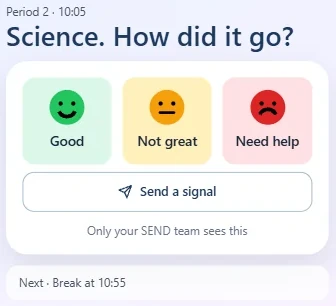
The Send Signals pupil app asking 'Science. How did it go?' with Good, Not great and Need help, and a Send a signal button
The check-in, in the app
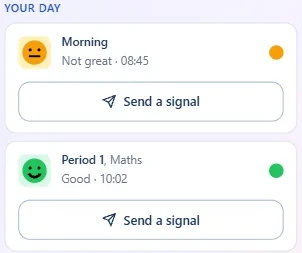
The pupil app's Your day list, showing Morning as Not great and Period 1 Maths as Good, each with a Send a signal button
Their day, in the app

The same app works on a tablet, a laptop or a Chromebook.

Check in

After each lesson, break and lunch, tap a face: good, not great or need help.

Add a signal

Then, if they want to, add a preset message like "I need help with my work". No typing.

See their own week

Their own pattern in colour, day by day. Only theirs, never anyone else's.

Download on the App Store Get it on Google Play

Why it exists

The pupils who most need support are often the least likely to ask.

Many pupils with SEND, especially neurodivergent pupils and those with anxiety, find it hard to say how they feel. They often mask, working harder than their peers just to get through the day, and small worries can build before anyone knows.

Honest answers, early enough to act.

Pupils tell us how they really feel when it's quick, private and the same every time. That gives staff a true picture while there's still time to be proactive: a quiet word, a simple adjustment, or just listening.

  • Speaking up is the barrierPutting a hand up, finding an adult or filling in a form all ask a pupil to do the hardest thing first.
  • Masking hides the patternA pupil can look fine in every lesson and still be struggling. Without a record, small signs never add up.
  • Identical every timeThe layout never moves and nothing surprises. Autistic pupils can rely on it working the same way in every lesson, every day.
  • Tap, never typeUp to 3 taps, under 10 seconds. Every answer is a tap on a preset option, and there is never a blank box to fill in.
  • Private by designPupils only ever see their own check-ins. That's enforced in the database itself, not just the app.

How it works

One check-in, from Oliver's pocket to the SEND team.

Oliver is anxious and doesn't want to talk about it. Here's what happens when Period 2 goes badly.

1

Period 2 ends. The fob buzzes.

A short vibration near the end of the lesson, and three faces on the screen. The same screen, in the same place, every single time.

2

He presses red. No words needed.

Under ten seconds. Pressed the wrong one? There's a moment to undo it before anything is sent.

3

Want to say more? He can send a signal.

After every face, the fob asks if he wants to send a signal. Yes opens Lesson, Wellbeing and Practical, each with preset messages his school chooses. No, and he's done.

4

The SEND team sees it straight away.

The check-in lands on the Staff Action Hub with the lesson, the period and his recent pattern beside it. If a pupil sends three reds, the team gets an alert.

5

Someone checks in at break.

A member of staff marks it Watching, Resolved or Escalated, so everyone knows it's in hand. Oliver didn't have to ask. Someone noticed anyway.


For the SEND team: the staff platform

Spot patterns. Step in early.

Every check-in is a pupil quietly telling you something. On the staff side, the Daily Dashboard fills in through the day: every lesson, plus break and lunch, when a lot of the hard moments happen. Patterns that used to take weeks to notice are there at a glance, so you can be proactive and check in.

Daily DashboardLive · 08:45
Example Daily Dashboard: seven fictional pupils, each lesson, break and lunch rated good, not great or need help.
PupilRegP1P2BreakP3P4LunchP5
Oliver P.Y9
Maya A.Y9
Leo B.Y7
Ava K.Y10
Noah S.Y8
Isla M.Y11
Sam T.Y7
GoodNot greatNeed helpFictional pupils. Each colour also has its own face shape.

Staff Action Hub

Start the day knowing who needs support. Overnight check-ins, and any signals sent with them, are waiting the moment you log on.

Three-red alerts

Three reds in a day, or in a row, flags the pupil and can send the team a push and an email. If nobody acknowledges it, it escalates.

Patterns and reports

Year group views, pupil histories and ready-made reports for reviews, parent meetings and data drops.

Data, safety and policy

Built to stand up to scrutiny.

The questions your data protection officer, your IT team and your governors will ask, answered before they ask them.

Pupil data stored in the UK
Our database and our servers both run in London. No pupil data is sold, and there's no advertising or tracking.
ICO Children's Code
Designed around the Age Appropriate Design Code: collect as little as possible, private by default, nothing hidden from the pupil.
Evidence of pupil voice
The SEND Code of Practice puts pupils' views at the centre of support. Ready-made reports turn their check-ins into evidence for reviews and governors.
Reads your MIS through Wonde
Pupils, staff and timetables come in from your MIS through Wonde. We only read; we never write back. No Wonde? Upload a file instead.
A record you can trust
A tamper-evident audit log of every change, and a ready-made pack to send straight to your IT team.
Fits your network
Fobs join your school Wi-Fi, including enterprise (802.1X) networks, and send pupil data only to Send Signals.

Send Signals is not an emergency service. It helps staff notice pupils who may need support sooner. It supports your school's safeguarding procedures and never replaces them.

For IT and data protection leads

Who we are

Real people, building something we believe in.

We're Nicky and Tim, a husband and wife team running a small business to make a difference in an area we both care deeply about. We've brought our skills together to help make school a better place for pupils, in a busy world that isn't always set up for everyone as easily as it should be.

Read our story

Nicky Youngman smiling, with Ziggy the dog

Nicola (Nicky) Youngman

Co-founder & Education Lead

Assistant Headteacher and SENDCo, leading SEND and Pupil Premium.

Tim Youngman on a boat, with Ziggy the dog

Tim Youngman

Co-founder & Product Lead

Built every part of Send Signals, from the fob to the apps.

Founding schools

Help us shape Send Signals.

We're inviting a small number of secondary schools to pilot Send Signals for a term. The software is free for the pilot, we lend the fobs, and you keep a founder price afterwards.

Limited places. Prefer to talk first? hello@sendsignals.co.uk